Do white character sheets kill the light? What 15 of our films show
A widely shared tip says to draw a character sheet on grey, never on white. We draw ours on white, so we looked. What we saw, why our pipeline may not show the problem, and how we make a sheet that holds across a film.
By Alper Mutlu Toksöz, founder, runimePublished . 18 min read. Checked 19 Nov 2026 on 15 films, by eye.
- 0 of 15
- films where a still showed a white halo, a white wall carried in from the sheet, or a shadowless studio look
- 7 of 15
- had a white model sheet. The other 8 had a single figure on white or near white
- 0 grey sheets
- drawn to compare against. This is a look at existing films, not a controlled test
The tip
runime makes animated films from a script. Before it draws a single shot it draws the cast: one wide picture per character, with the character seen from four sides. Every later still and every clip of that character is drawn against that picture. We call it the character sheet, and we draw it on pure white.
A widely shared tip among people who make films with AI says that is a mistake. Put the sheet on a grey background, it says, never on white, because white kills the light: the flat white of the sheet follows the character into the scene, and the scene's own light is lost.
The tip is not one person's idea. A guide to character sheets for AI film says a plain grey background works best1. A workflow published by one of the model hosts we use asks for even, shadowless studio light against a neutral grey background2. That page explains the flat light with care, and gives no separate reason for the grey. In the other direction, Luma's own learning page suggests that when a reference has a busy background, you first isolate the character on a white background and use that as the reference3.
The reason usually given for grey is that white spills into the shot and washes out the location. We found that sentence only second hand, in search summaries of a course page that did not show the text when we opened it. And we found no controlled comparison anywhere: nobody we could find has drawn the same character on white and on grey, run both through the same shots and published what changed.
So the honest status of the tip is: plausible, repeated by practitioners, contradicted by at least one vendor's own advice, and untested in public. This note does not settle it. It reports what our own films look like.
What we looked at
The tip says a default of ours may be doing harm, and that can be checked without drawing anything new. If white sheets kill the light, the films members have already made on runime should show it.
In 0 of the 15 films did we see any of the three signs. In every film the characters took the light of the scene they were in: hard window light with cast shadows, a pendant lamp over a table, warm firelight, blue night light with a rim on one side, low sun outdoors. No halo, no white wall or floor that the scene did not call for, no studio look.
1 of the sheets was already light grey, by accident of the image model and not by design. Its stills looked no different from the stills of the white ones. That is one sheet, and it proves nothing in either direction.
Those films belong to members, so none of them is shown here, and we do not describe any one of them. We publish counts from members' films and nothing else of theirs. Every picture on this page comes from a film made in the founder's own account.
One film, one white sheet, four kinds of light
A count does not show what "took the scene's light" means, so here is one film to look at. It is the founder's, a short called Light the Way Home, and it is not one of the 15. We picked it because its twelve shots pass through four very different lights: a stone stairwell in a storm, a dark lamp room, the same room once the lighthouse lens is burning, and a ship's deck at sunrise.
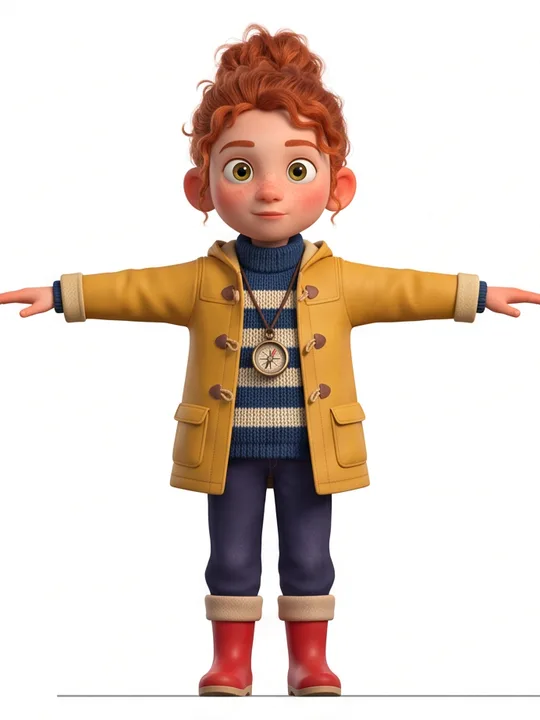
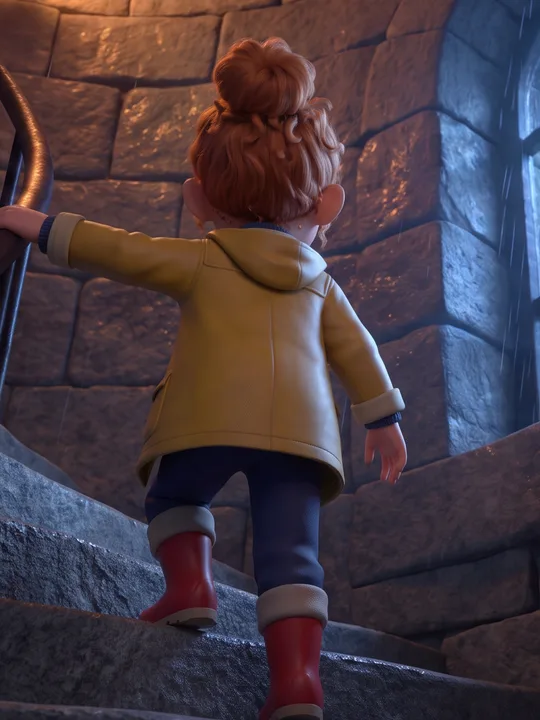
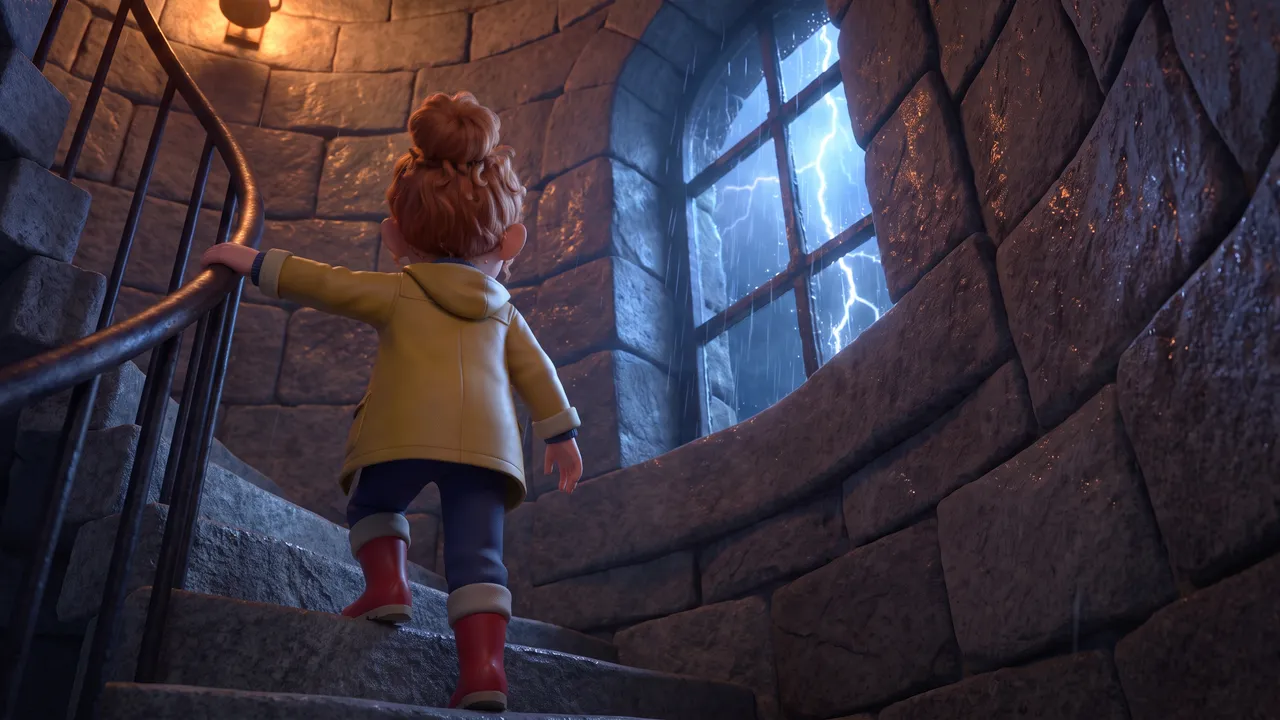
- The shot's own light plan
- Chiaroscuro, night
- What the light does on her
- Seen from behind on the tower stairs. A warm wall lamp lights her hair and the back of the coat, which dulls to olive. The storm window throws cold blue along the stone, and her legs fall into shadow.
Light the Way Home, a film made in the founder's own account. The sheet and the stills are as the product drew them, resized. The descriptions of the light are ours, written by eye.
On the sheet her coat is a clean mid yellow and her skin is evenly pink. In the stairwell the coat dulls to olive under a wall lamp and her legs fall into shadow. In the dark lamp room the coat is muted and its folds carry real shadow. Beside the lit lens one side of her goes orange. At dawn she has a bright rim along the hair and a warm shadow over the face. None of the four looks like a figure cut out of a white page.
This is an example, chosen by us, from a film we made. It shows what we mean. It is not evidence beyond itself.
Why our pipeline may not show it
We can offer a reason, from the code. It is an explanation that fits what we saw, not a proof.
The sheet is handed over as identity, and nothing else. When a shot's still is drawn, the sheet goes in as one reference picture among several, each with a label that says what it is for. The sheet's label asks the model to use it to keep the identity, face, hairstyle, wardrobe and proportions exact. It goes on: "Take the LOOK from the sheet and the POSE, ANGLE and ACTION from the staging described below". The label is in app/api/projects/[id]/render/route.ts. It says nothing about light, in either direction. The separation is by role, not by a rule against white.
The scene's light has three sources of its own, and the sheet is none of them.
- The shot's plan. Every shot carries a key light from a fixed list (low key, chiaroscuro, golden hour, moonlight, firelight, volumetric and others) and a time of day. Both become sentences in the still's prompt. The time of day says where the sun is and which way the shadows fall. The list is
KEY_LIGHTinlib/ai/shot-intents.ts. - The place. The location has its own picture, drawn before any shot, and the still is told to reproduce that place: its architecture, materials, colours and light. A location can also have a set with several views, and a view the member framed inside the set is taken as the shot's camera.
- The weather. A place that was designed with rain, snow or fog keeps it in every shot there. The sentence is built in
lib/ai/weather-lock.tsand is never dropped from a prompt.
The video never starts from the sheet. By default a clip of ours starts from the shot's still: the video model is told to take it as the exact first frame. The sheet can ride along as a reference for the character's identity from other angles, but the light of the clip is already in its first frame.
The sheet is lit flat on purpose. The sheet prompt asks for one soft, broad light with a gentle fill, the same on every figure, and no shadow cast on the background. Flat light gives a model the shape and the colours with no lighting pattern attached to them. The workflow we cited above makes the same argument: a hard side light on a reference gets treated as anatomy and carried into scenes lit from somewhere else2. That part of the common advice we follow. Only the backdrop colour differs.
Here is where the tip may still be right. It is often given for a way of working where a character picture goes straight to a video model as a reference, with no drawn first frame and no separate picture of the place. In that setup the sheet is most of what the model sees, and it is easy to believe its white would leak. Our stills are drawn from a location picture and a written light plan, with the sheet as one labelled reference. We cannot speak for a pipeline built the other way, and our check says nothing about it.
What switching to grey would cost us
If the check had shown the problem, we would have changed the backdrop. It is not a one-word change, because our white carries weight.
- The prompt. White is named all through the sheet prompt: in its opening line, in the gaps between the views and between the heads, under the detail drawings, in the line that asks for one flat background, and in the frame rule (
SHEET_FRAME_GUIDE), which asks for white to fill the frame edge to edge with a clear white margin all round. - The panel cutter.
lib/ai/sheet-panels.tscuts a sheet into its four views with plain image processing and no model call. It finds the row of figures and the gaps between them by looking for lines of pixels that are bright and uniform: a mean brightness above 236 out of 255 (LIGHT = 236) and a variance under 120. A mid grey sheet has no such lines, so the cutter would find one band and return nothing. - What depends on the cutter. Turning a character into a 3D model needs the front, side and back views as three separate pictures. Without a cut, that path falls back to a single picture, and a mesh built from one view has a guessed back.
- The way back. A member can bring a 3D model of their own. We photograph it from four sides and lay the four pictures out as a sheet on a white canvas, exactly as the cutter expects to read it. That canvas would change too.
- Sheets that exist. Every sheet already drawn is white. A cutter that understands grey has to keep understanding white.
The fix is known: measure the backdrop from the sheet's own corners and compare each line against that, in place of a fixed number. We looked at how much room the fixed number leaves today. Across the 79 character sheets in the founder's own account, from 14 films, 74 had all four corners at 250 or brighter. 3 had a corner between 236 and 249. 2 had a corner under 236, the darkest at 229. A corner is not a gap between figures, so this does not say the cutter failed on those sheets. It says that a model asked for pure white mostly returns it and sometimes does not, and that a fixed line is already tight.
One more detail points the same way. When a member uploads a finished character and asks us to use it as it is, we cut the figure out and place it on a light grey of 242 out of 255. That is grey to the eye and still above the cutter's line. It is as far towards grey as we can go today without touching the cutter.
What a real test would need. The same characters drawn twice, once on white and once on a neutral grey, with everything else held. The same shots drawn from both, on each image model we use, more than once each because the models are not deterministic. Then a reader who does not know which is which. We have not run it. It means paid renders, and since 19 November we do not run paid test renders: measurements come from what members make. So the question of whether grey would be better for us stays open. What we can say is that white is not visibly hurting.
The decision: we keep white. We will look again if a member reports flat light on a character or a white wall behind one.
What a sheet is for
The rest of this note is practical. It is how we make a character sheet, why each part is there, and what we learned the hard way. Every rule below is in our code or our own records, and the file is named.
A film restages its characters in every shot: a new angle, a new pose, a new light. An image model has no memory of the last shot. Whatever is not in the pictures and the words it is given, it invents again. The sheet is the one picture that says what stays the same.
Ours is a single wide image drawn in one pass. It used to be four separate pictures: a three-quarter view, a side, a back and a face. Those cost four renders, each went stale when the main picture changed, and because they were drawn independently they could disagree about the length of the hair or the hem of a coat. One pass is what makes the views agree. They come out of a single act of drawing.
The sheet is also the one picture we do not let the model router choose a model for. By default it is pinned to the one image model family we use that draws a multi-panel sheet as one person, takes a wide frame and prints legible captions. A model that fails at the first of those returns four different people, and every shot after that inherits the disagreement.
The parts of a sheet, and why each is there
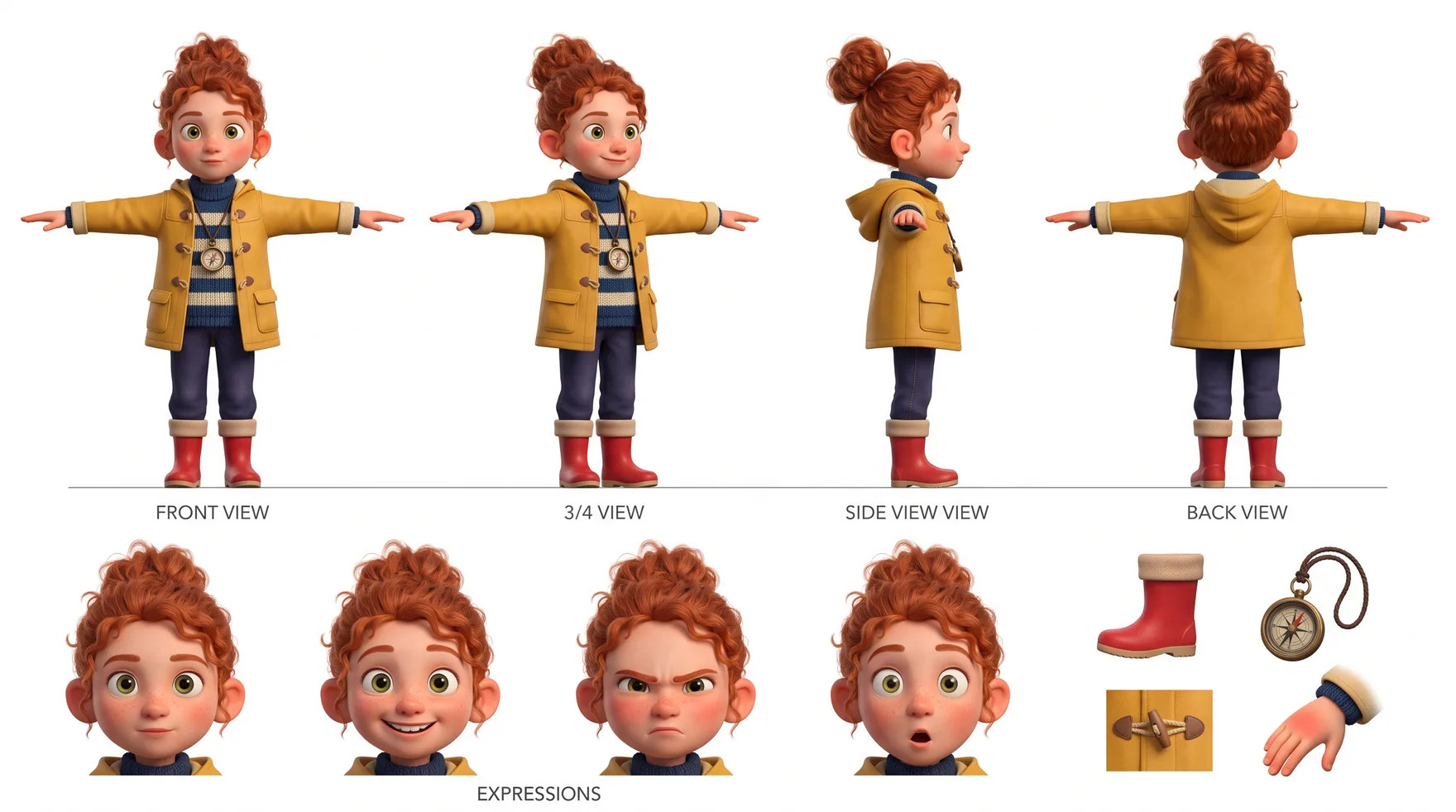
Four full-length views
- The prompt asks for
- Front, three-quarter, side profile and back, left to right, on one ground line, at the same height and the same scale, each showing the whole body from the top of the head to the soles of the feet.
- Why it is there
- A shot can frame the character from any side. The still prompt names the one panel that matches the shot's camera, so a back view is copied from a drawing of the back and not guessed from the front.
- On this sheet
- All four came back at one scale. The image model drew the ground line as a literal grey rule, which nobody asked for and which does no harm.
- Where the rule lives
app/api/projects/[id]/render/route.ts (characterSheetPrompt, sheetPanelHint)
The same film's other two sheets, and where each left the prompt
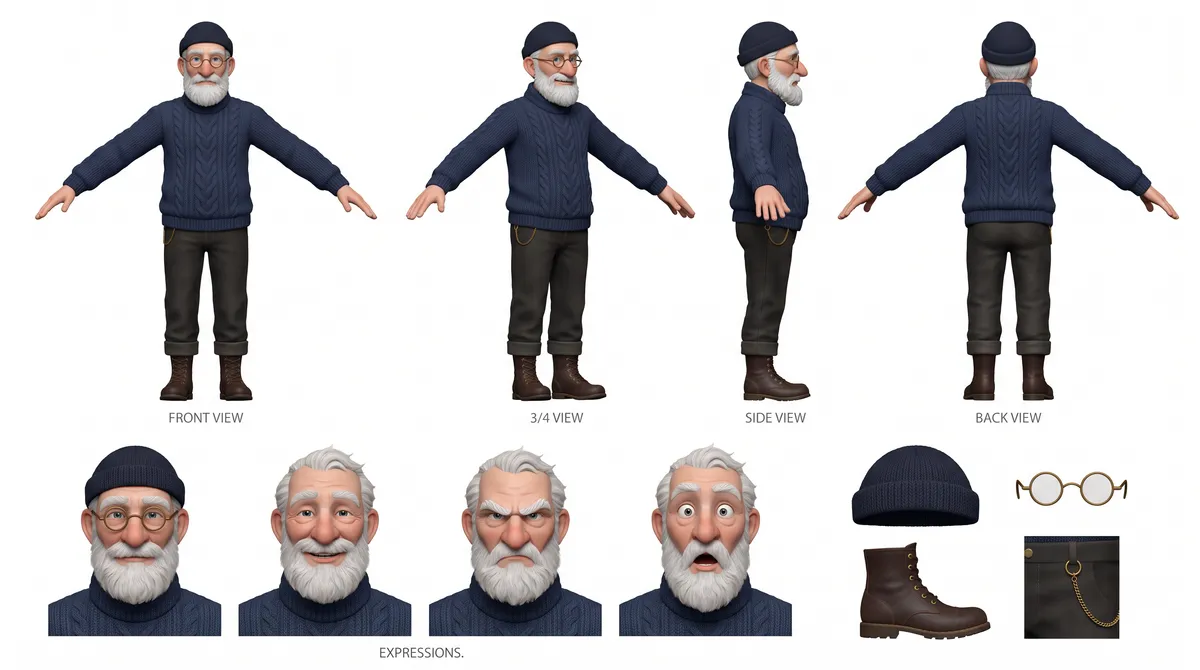
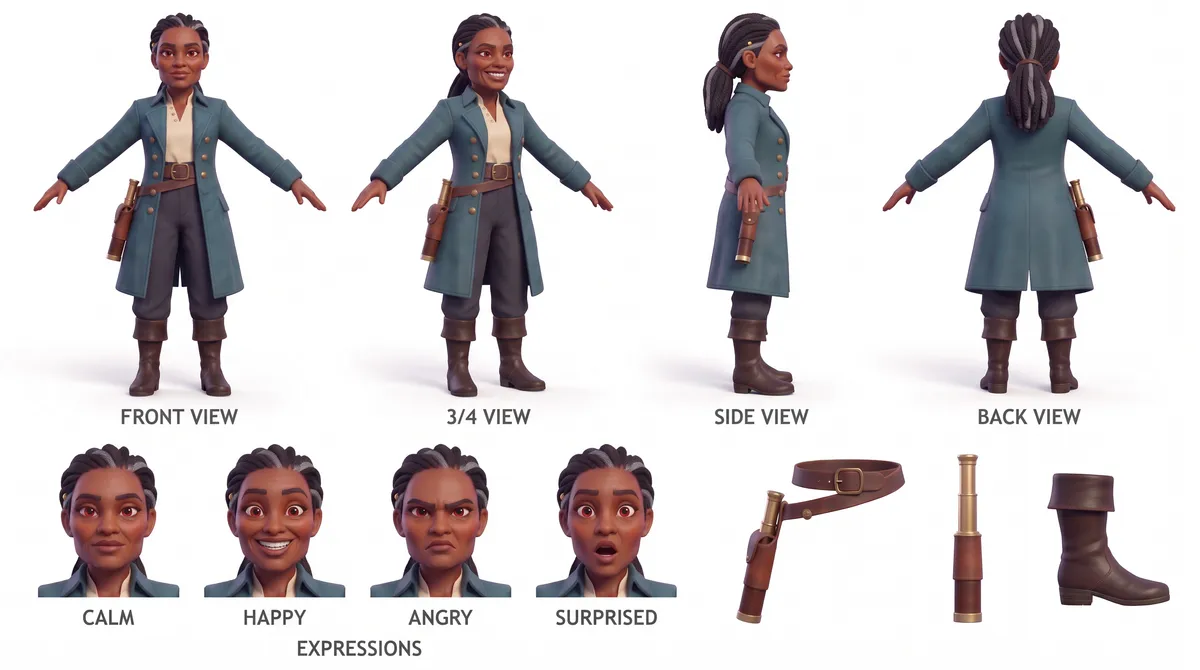
Light the Way Home, a film made in the founder's own account. The sheets are as the product drew them, resized.
Four views, not three. Front, three-quarter, side and back. The guide we cited calls front, profile and three-quarter the minimum, and adds the back for full-body characters1. In a film the back is not optional: characters walk away from the camera, climb stairs, stand at windows. A back that is not on the sheet is invented in each shot, and the hair is where it goes wrong first.
The shot names its panel. A sheet with four views is also four chances to pick the wrong one. Left alone, a model falls back on the front view, and the character comes out squared up to the lens whatever the shot asked for. So each still's prompt names the panel to read: the back view for a character facing away, the side view for a profile, the front for a frontal shot, the three-quarter view for everything else. It is one line, derived from what the shot already declares (sheetPanelHint).
The pose is a stance, not a pose. A human stands in a T-pose so nothing is hidden. The price is that a model may copy it, and a character arrives in the kitchen with arms out. Every shot that uses the sheet says so in plain words: the sheet's pose is a reference stance and never the pose of the shot. A bird, a four-legged animal, a creature and a living object each get a neutral pose of their own (POSE_BY_BODY), because a human pose handed to a sparrow gives you a person in a sparrow costume.
Expressions are there for the face. The four heads put the face on the sheet at a size a model can read. One vendor's guide gives the reason in terms of area: a face that fills a small part of a wide view carries little of the character's identity, and close-ups give a model enough to hold the small features4. A close shot of ours is told to read the heads as well as the matching view.
Callouts are for what the character wears, and only that. Two to four items the character already has on: a hat, a bag, a belt, boots. No new object of any kind. A prop that matters to the story is its own entry in the film with its own picture, and a second drawing of it on a character's sheet would give the film two versions to choose between.
Captions, and a ban on them. The sheet is the one place where we lift our own rule against text in a picture. A caption under each view tells a model which angle it is looking at. The cost came back quickly: stills arrived with a character's name lettered into the scene, copied from a captioned reference. Since then every prompt that carries a sheet also says that the references are annotated and that none of their lettering may appear in the picture (CAPTION_BAN).
What breaks identity after the sheet
A good sheet is necessary and not enough. Most of the identity failures we have traced were not in the sheet. They were in what happened to it on the way to the model. These are from our own audit of September 2026 and the fixes since.
- The sheet never arrived. Some engines take three or four reference pictures and silently drop the rest. Our request listed a character's extra views before the next character's main picture, so with three characters in a shot the third could be cut off entirely, while the prompt still told the model to draw only the characters shown. The fix was order: every character's main picture is seated first, and extras fill what is left.
- The prompt described pictures that were not there. After a provider trimmed the list, our text still announced the full count and called a missing picture the absolute source of a character's look. The model bound a name to nothing and invented the character. Labels for dropped pictures are now dropped with them.
- A picture with no name. One video path sent a character's face, main picture and sheet with not one word about who they showed. A reference a model cannot tie to a name is decoration.
- An engine that reads a sheet as four people. Not every model reads a multi-panel sheet as one character. One of the image engines we carry tiles the panels into the shot as separate people. Such an engine is marked in our capability table and is never handed a sheet. It gets the character's single front figure instead.
- A body nobody wrote down. In one of the founder's films the lead is a leaf with a face. It had arms in one shot, dangling legs in the next, no limbs at all in three others, and sandalled legs in three more. The design said "a leaf with a face" and every shot guessed the rest. Each character now carries one line naming the parts it has and the parts it lacks. That line is on the sheet's prompt and on every still and clip after it (
lib/ai/anatomy.ts). - A side view that faces the wrong way. The sheet prompt asks for a side profile and does not say which side, so the model draws either. For stills that does not matter. For a 3D model it does: the service takes the views in a fixed order, front, left, back, right5, and a left view has the nose pointing at the left edge of the picture. A right profile in that slot tells it the head points the other way, and the mesh comes back with a face on both sides. We learned this from a model on our own landing page. Now one vision call reads which way the profile faces, and a right profile is mirrored before it is sent (
lib/ai/profile-facing.ts).
Some suspicions did not survive checking, and we list them so nobody fixes them. A claim that faces reached the model at 11 pixels was out of date: each face travels as its own tile of about 768 pixels. A claim that video engines were denied the face was wrong: the sheet's expression row carries it at a readable size. Both are in docs/product/reference-fidelity.md with the evidence.
What a sheet cannot do
- It cannot light a scene. That is this note's first half. The sheet is flat on purpose. The light comes from the shot's plan and from the place.
- It cannot say how big the character is. On the sheet a figure fills its panel. Dropped into a street, a model keeps it that size, and people come out as giants with their heads at the rooftops. Size against the set has to be stated separately, as a ratio between a standing person and the buildings, and as a real height when the design gives a number with a unit. A close shot is the exception, because there the subject is meant to fill the frame.
- It cannot choose the camera. Four views are not a camera angle. The staging text and the shot's own framing decide that, and the sheet only says which panel matches.
- It cannot make the model remember. Attaching a reference to every request is weaker than training on the character. At least one product known for steady faces trains a small model per character and calls the character by name, and its own material, which we read in September 2026, names re-attaching references on every request as where face drift comes from. Ours re-attaches the sheet each time. Training a character from the sheet and the pictures it already has is on our roadmap and is not built.
- It does not come out as asked. Figure 2 shows three sheets from one film: one with a misprinted caption, one with the arms lowered, one with captions and shadows nobody asked for. A sheet is a drawing by a model. Read it before a film is built on it. A member can redraw a sheet, and every earlier take is kept.
Limits
- Small. 15 films, 2 stills from each. A problem that shows in one still in twenty would pass unseen.
- By eye, by one reader, not blind. A vision model looked for three named signs and knew the question. Flat light is a matter of degree, and a person might draw the line elsewhere. Nobody measured contrast or colour.
- No control. We have no grey sheets to compare with. We saw that white sheets did not visibly hurt. We did not see whether grey would help. Those are different findings, and only the first is ours.
- White and near white together. 7 of the 15 films had a full sheet. The other 8 had a single figure on white or near white. The two groups looked the same on this question, and neither is large.
- One pipeline. Our stills come from a location picture, a written light plan and a labelled sheet. A workflow that hands the sheet straight to a video model may behave differently, and the tip may hold there.
- Stills only. We read stills, not clips. Our clips start from the still, so its light is the clip's first frame, but we did not check how the light holds through the motion.
- The example is ours. Figure 1 is one film, picked by hand because its light changes so much.
If someone runs the controlled comparison and publishes it, we will link it here with its date. If our own members' films start to show the problem, we will say so here too. The date at the top of this note will not change.
Sources
Each with the date of the work and the day we read it. Numbers about our own films come from our own records, described under What we looked at.
- Flick Team, How to Make a Character Reference Sheet with AI (and Reuse It Across a Whole Film). flick.art blog, July 2026.flick.art/blog/how-to-make-a-character-reference-sheetRead
- John Ozuysal, AI Character Consistency: Prompts and Workflows. fal Learn, 22 September 2026.fal.ai/learn/tools/ai-character-consistencyRead
- Luma, Character reference. Luma Learning Hub, byline 29 October 2025.lumalabs.ai/learning-hub/character-referenceRead
- invideo, Why do AI character sheets need close-up panels, not just full-body views?. invideo FAQ, page updated 27 July 2026.invideo.io/faq/why-do-ai-character-sheets-need-close-up-panels-not-just/Read
- fal, Tripo H3.1 Multiview to 3D, input schema. fal model page, undated, as it stood in November 2026.fal.ai/models/tripo3d/h3.1/multiview-to-3d/llms.txtRead
runime is the product these notes come from. It turns a script or an idea into an animated film. See what it does